Getting Started
Project Sharing
Project Sharing allows project owners to keep projects private by default and share them with selected colleagues when collaboration is required.
Overview
Project Sharing allows users within the same company workspace to collaborate on selected projects without making every project visible to everyone by default.
New projects are private by default and appear under My Projects for the project creator. Shared projects appear under Projects Shared With Me for users who have been given access.
Projects can only be shared with users in the same workspace. Project sharing does not apply to the individual app subdomain.
Sharing a project
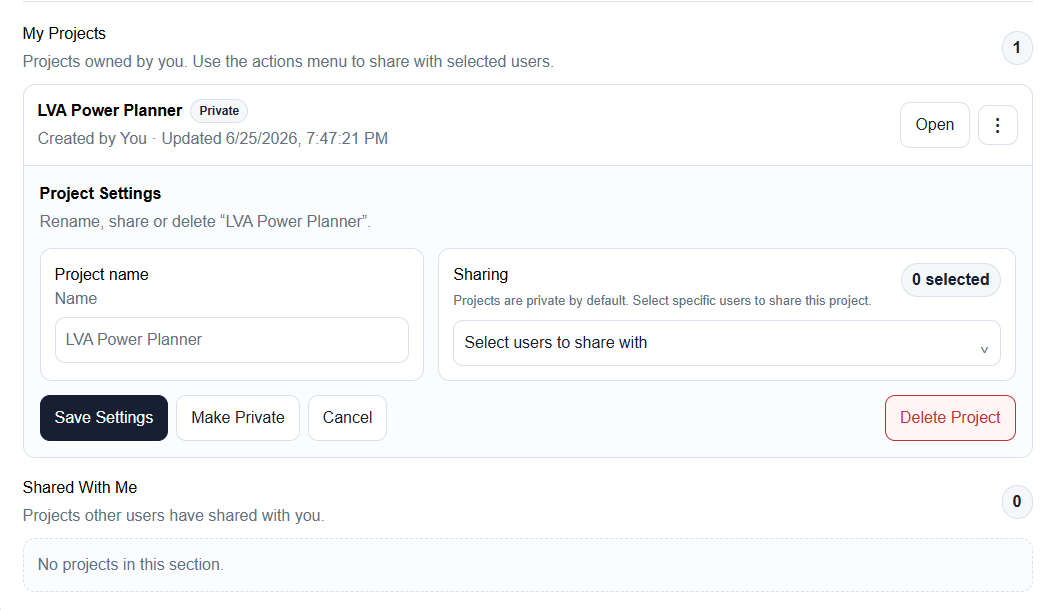
To share a project, open the project actions menu from the project card in My Projects. The actions menu is shown as a three-dot button on the project card.
In Project Settings, choose the users who should have access from the sharing dropdown, then save the sharing changes.
- Open the project dashboard.
- Find the project under My Projects.
- Select the three-dot project actions menu.
- Open Project Settings and choose the users to share with.
- Save the sharing changes.
Making a project private
A shared project can be made private again by the project owner. Making a project private removes shared access for other users while keeping the project available to the owner.
Use this when a project no longer needs collaboration or when access was granted temporarily for review.
When a project is made private, users who previously had access will no longer see it under Projects Shared With Me.
Administrator controls
Workspace administrators can enable or disable Project Sharing for each workspace. This allows collaboration to be tested or rolled out only where required.
If you expect to see sharing controls but they are not visible, Project Sharing may not be enabled for your workspace.
Related articles
Send feedback or request extra documentation for this topic.